Libero Mfg Plugin Installation in iDempiere
Updated Code and Installation
https://github.com/pshepetko/org.idempiere.mfg - see installation instructions in readme. Please use the above link for updated instructions. The rest of this page is quite old. I am keeping for referenceOLD Introduction
OLD How the iDempiere Mfg Plugin came to Exist
OLD iDempiere Libero Mfg Plugin Installation Description
OLD iDempiere Libero Mfg Plugin Installation - Ideal Process
OLD iDempiere Libero Mfg Plugin Installation - from Development Environment
OLD iDempiere Libero Mfg Plugin Installation - From Fork That Includes WebUI Forms
Previously, Eugene Author and Peter Shepetko released a fork of Redhuan's Libero Mfg plugin. The most significant aspect of this fork is its inclusion of the WebUI versions of Libero forms. This means you can use most of Libero Mfg from the WebUI. Repository: https://bitbucket.org/pshepetko/org.libero.mfg62 There is no ready-made plugin jar that will work with java 1.6. Below are the details and steps associated with getting it up and running in a Java 1.6 environment. Step 1 - Download the code- Eugene's repository uses git.
- To install git, use "sudo apt-get install git".
- I recommend you download the code to the following directory: /home/ubuntu/dev/plugins/. If you have already downloaded Redhuan's libero code, you will need to make an additional directory named "eugene-libero". The resulting path is "/home/ubuntu/dev/plugins/eugene-libero"
- To download the code, navigate to the desired folder and use the command "git clone https://bitbucket.org/pshepetko/org.idempiere.liberomfg.git"
- Use the File=>Import=>General=>Existing Project into Workspace
- Select the root directory and import.
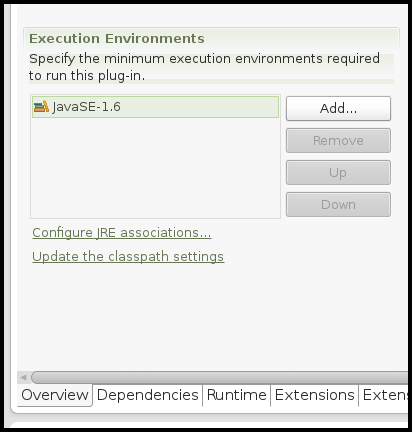
- Open the org.idempiere.liberomfg project=>manifest and modify the Execution Environment section to use 1.6 instead of 1.7.
- Click on the "Update Class Path Settings" link directly below the Execution Environment section. This action should get rid of all environment errors related to Java 1.7. See the image below for reference.
- Select Project menu => Clean menu option and clean.
- Right-click on the org.idempiere.liberomfg project=>Properties option => Java Compiler and confirm all greyed out options show 1.6 (not 1.7).
 Step 4 - Run it in your IDE and Test
- Open the Run Configuration for server.product => Plugins tab => make sure org.idempiere.liberomfg is selected. Give it a start level of 1 and set to auto start.
- Run server.product and confirm you can open the Order Receipt and Issue window.
- Open the org.idempiere.liberomfg manifest.
- Use the Overview tab => Export wizard to export this project to a jar file.